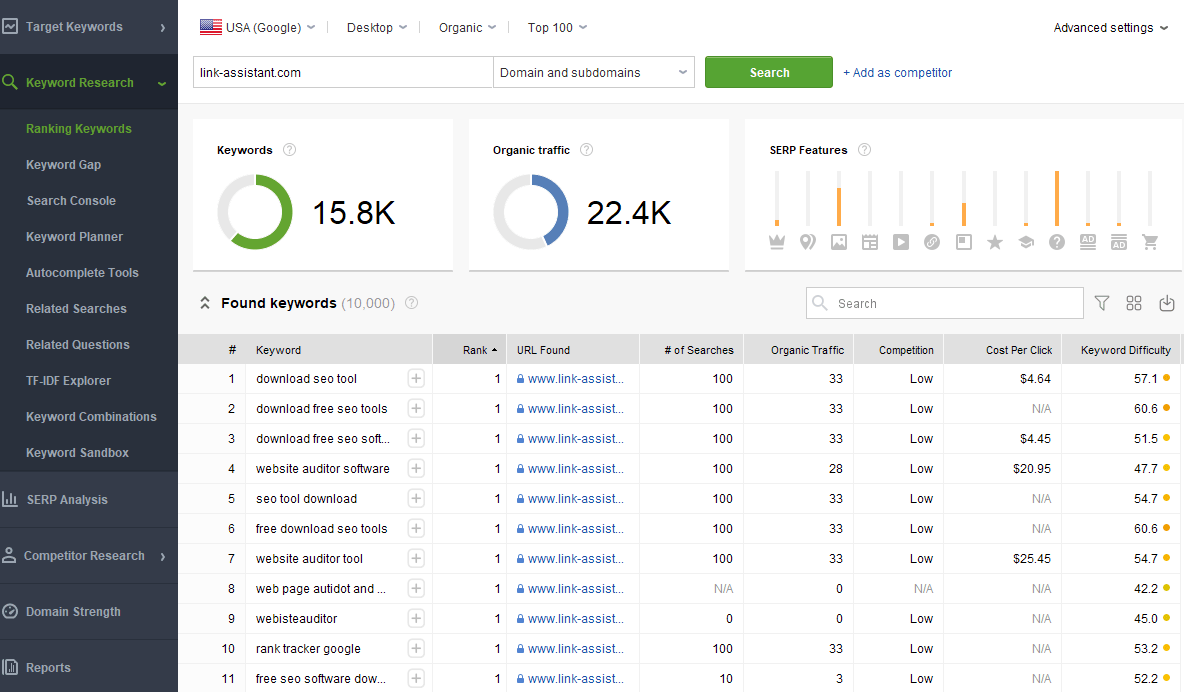
Finding your keyword rankings helps you understand how visible your website is in search results. By checking where your pages appear for the terms people search for, you can spot opportunities, measure progress and decide what to improve next.
A keyword ranking is the position of a webpage in search results for a particular search term. For example, if your page appears as the fifth organic result for “handmade candles”, its ranking for that search is position five.
Rankings can vary depending on the search engine, location, device and other factors. A single position is therefore only a snapshot. It is more useful to look at trends over time and consider how rankings relate to website visits and enquiries.
Google Search Console is a free tool that shows how your website performs in Google Search. In the Performance report, you can review queries that have shown your pages in search results, along with impressions, clicks, click-through rate and average position.
Average position is useful for identifying general movement, but it is not a guaranteed ranking for every search. Results can differ between people and locations, and the report combines data across searches and circumstances.
You can search for a keyword in a browser to see which pages appear. This can give you a quick sense of the results, but it is not the most reliable way to track rankings. Search results may be influenced by your location, search history, device and the exact wording of your query.
If you check manually, use a consistent approach and avoid drawing conclusions from a single search. Search for the exact phrase you want to monitor, note the date and location, and record the result over time.
SEO platforms often offer keyword rank tracking. These tools let you choose keywords, locations and devices, then monitor how selected pages move in search results. Depending on the tool, you may also be able to compare your visibility with competitors or receive alerts when rankings change.
When choosing a tool, consider the number of keywords you need to track, the locations you serve, reporting options and cost. Check how frequently rankings are updated and whether the tool clearly explains what its figures represent.
Start with the searches that are most relevant to your products, services or content. A useful tracking list might include:
Avoid tracking every possible variation. A focused list is easier to review and more likely to reveal useful patterns. Make sure each keyword has a relevant page on your site; one page may naturally appear for several closely related searches.
For most websites, reviewing rankings regularly is more useful than checking them every day. A weekly or monthly review can help you notice meaningful changes without overreacting to normal fluctuations. If you are making a major website update or running a campaign, you may want to monitor performance more closely for a limited period.
Record the date range, search location and device settings where possible. Consistent tracking makes comparisons more meaningful.
A rise or fall does not automatically mean that you need to change a page. First, check whether the movement is sustained and whether it affects clicks, traffic or enquiries. Then review the page and the search results to understand what may be happening.
Search engine optimisation is an ongoing process. Improving useful content, site structure, page experience and technical accessibility can all support better search visibility, but no single change guarantees a particular ranking.
Keyword positions are only one measure of SEO performance. A high ranking may not be valuable if the search is unrelated to your business or does not lead to meaningful visits. Consider rankings alongside organic clicks, relevant website traffic, enquiries, sales and conversions.
Used this way, keyword ranking data becomes a practical guide rather than a score to chase. It can show which pages are reaching the right audience and where your website may have room to grow.
Use Google Search Console to check how your website appears for different search terms. In the Performance report, open the Queries tab to see the keywords that bring your pages into Google Search, along with impressions, clicks and average position. This gives you a useful overview of your search visibility and helps you identify terms or pages that may need attention. Keep in mind that average positions can vary by location, device and search, so look for trends over time rather than relying on a single figure.
Track keyword rankings by country and device to get a clearer picture of how different audiences find your website. Search results can vary between locations, while mobile and desktop users may see different rankings. Set the countries and devices that matter to your business, then compare performance consistently over time. This helps you identify where your visibility is strongest and where your content may need further attention.
Compare your keyword positions with those of key competitors to see where your website is performing well and where there may be room to improve. Focus on businesses targeting the same audience, and look at which pages appear for your priority searches. Competitor rankings can reveal useful content ideas and search opportunities, but treat them as context rather than a target: prioritise creating relevant, helpful pages for your own customers.
Monitor keyword rankings weekly rather than checking them every day. Search positions can fluctuate naturally, so daily changes may be misleading or cause you to react too quickly. A weekly review makes it easier to spot sustained trends, assess the impact of your SEO work and decide whether any action is needed.
Check your keyword rankings in an incognito or private browser window to reduce the influence of your search history and personalisation. However, results can still vary by location, device and other factors, so a rank-tracking tool is a better choice for consistent monitoring. Set your target keywords and location, then review changes over time rather than relying on a single search.
Group keywords by topic and search intent to make your ranking data easier to understand and act on. For example, keep informational searches, such as “how to clean suede shoes”, separate from purchase-focused searches, such as “buy suede shoe cleaner”. This helps you compare like with like, identify which pages are performing for each type of query, and spot gaps where you may need clearer or more relevant content.
When checking keyword rankings, review clicks and impressions alongside average position to get a fuller picture of performance. Impressions show how often your page appears in search results, while clicks reveal how many people visit it. If impressions are rising but clicks remain low, consider whether your page title and description match the search and encourage people to click. Looking at these metrics together helps you judge whether ranking changes are bringing more visibility and useful traffic.
If a page’s keyword rankings decline, review and update it to make sure it still meets searchers’ needs. Check that the information is accurate, useful and up to date, then improve any sections that are unclear, incomplete or less relevant than competing results. Also check for technical issues, such as broken links or slow loading times. Make thoughtful changes based on what the page needs, then monitor its performance over time rather than expecting an immediate recovery.
